
6.12. CDD ADC Module Migration
Migration Approach: Follow sequential migration for clear understanding of changes at each version. Each migration is organized by individual changes with description, old vs new comparison, and migration actions.
6.12.1. v05.00.00 (i.e release v26.00.01) from v04.00.00 (i.e release v26.00.00) Migration
6.12.1.1. Summary
Version v05.00.00 introduces the following changes to the CDD ADC module:
ASysCtl configuration parameters moved to ResourceAllocator: Temperature sensor, analog reference voltage, and internal test node parameters have been removed from the ADC plugin and are now configured centrally in the ResourceAllocator
ASysCtlcontainerCdd_Adc_SetInternalTestNode()replaced byMcu_ASysCtl_SelectInternalTestNode(): The internal test node runtime API has moved from the ADC module to the MCU module
6.12.1.2. Change 1: ASysCtl configuration parameters moved to ResourceAllocator
6.12.1.2.1. Description
Configuration parameters that control analog system control (ASysCtl) hardware — temperature sensor enable, analog reference voltage selection, and internal test node selection — have been removed from the ADC plugin and the generated Cdd_Adc_HwUnitCfgType struct, and are now configured centrally in the ResourceAllocator plugin under ResourceAllocatorGeneral → ASysCtl. All ASysCtl register writes are now performed by Mcu_Init() from the generated Mcu_ASysCtlConfigType structure.
This affects two layers:
EB Tresos configuration: parameters removed from
CddAdcConfigSetandCddAdcHwUnitcontainersGenerated C code: struct fields
voltref,analogrefsel, andanalogrefvoltselremoved fromCdd_Adc_HwUnitCfgType; macrosCDD_ADC_TEMPERATURE_SENSOR_ENABLEandCDD_ADC_LOCK_TEMPERATURE_SENSORremoved fromCdd_Adc_Cfg.h
6.12.1.2.2. Old vs New
EB Tresos configuration parameters:
Old Parameter [ADC plugin] |
Old location |
New Parameter [ResourceAllocator Plugin] |
New location |
|---|---|---|---|
|
|
|
|
|
|
|
|
|
|
|
|
|
|
|
|
|
|
|
|
|
|
|
|
Note
CddAdcLockTemperatureSensor has been removed and is not replaced by a configuration parameter. Temperature sensor locking is now a runtime operation performed via Mcu_ASysCtl_CommitLock() in the MCU module.
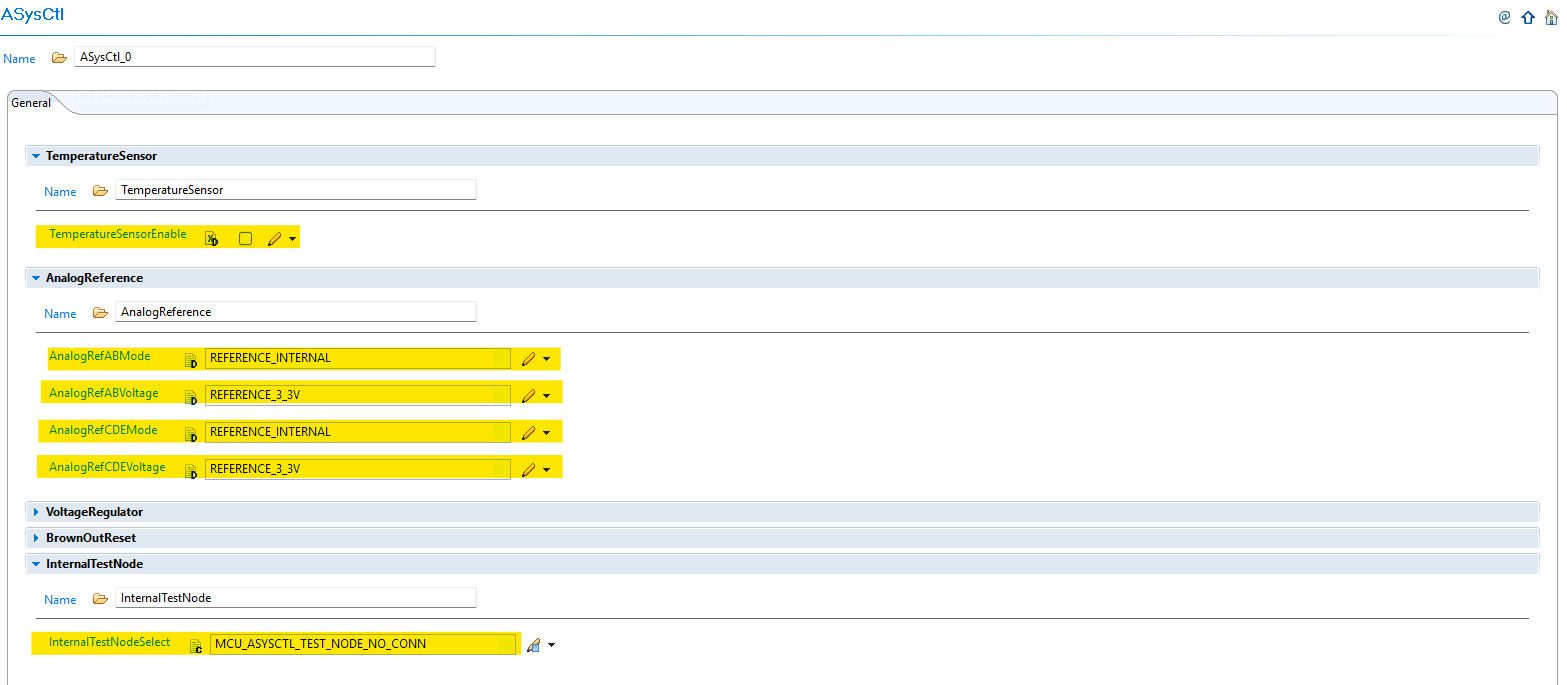
Fig. 6.46 New ASysCtl container under ResourceAllocatorGeneral showing TemperatureSensor, AnalogReference, and InternalTestNode sub-containers
6.12.1.2.3. Migration Actions
Note your existing ADC ASysCtl settings: Before migrating, record the values of
CddAdcEnableTemperatureSensor,CddAdcInternalTestInput, and the fourCddAdcHwUnitAnalogRef*parameters from your ADC pluginOpen ResourceAllocator in EB Tresos: Navigate to
ResourceAllocatorGeneral → ASysCtlAdd an
ASysCtlinstance if one does not already existConfigure
TemperatureSensor: SetTemperatureSensorEnableto match your previousCddAdcEnableTemperatureSensorvalueConfigure
AnalogReference: SetAnalogRefABModeandAnalogRefABVoltageto match the previousCddAdcHwUnitAnalogRefABVoltageModeandCddAdcHwUnitAnalogRefABVoltagevalues; repeat forAnalogRefCDEModeandAnalogRefCDEVoltageConfigure
InternalTestNode: SetInternalTestNodeSelectto match your previousCddAdcInternalTestInputvalue, using the newMCU_ASYSCTL_TEST_NODE_*enum literals in place of the oldCDD_ADC_TEST_NODE_*literalsRegenerate the project: Regenerate the MCU plugin output (
Mcu_Cfg.candMcu_Cfg.h) so that the newMcu_ASysCtlConfigTypestruct andMcu_ASysCtlTestNodeTypeenum are available before building
6.12.1.3. Change 2: Cdd_Adc_SetInternalTestNode() replaced by Mcu_ASysCtl_SelectInternalTestNode()
6.12.1.3.1. Description
The runtime API for selecting the internal analog test node has moved from the ADC module to the MCU module. Cdd_Adc_SetInternalTestNode() has been removed and replaced by Mcu_ASysCtl_SelectInternalTestNode(). The enum type used for the test node selection has also changed from Cdd_Adc_InternalTestNodeType (generated in Cdd_Adc_Cfg.h) to Mcu_ASysCtlTestNodeType (generated in Mcu_Cfg.h), and the enum literal prefix has changed from CDD_ADC_TEST_NODE_ to MCU_ASYSCTL_TEST_NODE_.
6.12.1.3.2. Old vs New
Aspect |
v04.00.00 (v26.00.00) |
v05.00.00 (v26.00.01) |
|---|---|---|
API |
|
|
Header |
|
|
Enum type |
|
|
Enum prefix |
|
|
6.12.1.3.3. Migration Actions
Find all calls to
Cdd_Adc_SetInternalTestNode()in your application codeReplace each call with
Mcu_ASysCtl_SelectInternalTestNode(), keeping the same argument valueUpdate enum literals: Replace
CDD_ADC_TEST_NODE_*literals with the correspondingMCU_ASYSCTL_TEST_NODE_*literals (the names after the prefix are identical, e.g.CDD_ADC_TEST_NODE_VDDCORE→MCU_ASYSCTL_TEST_NODE_VDDCORE)Update includes: Ensure
Mcu.his included in any file that callsMcu_ASysCtl_SelectInternalTestNode();Cdd_Adc.hno longer exposes this API
6.12.2. v04.00.00 (i.e release v26.00.00) from v03.00.01 (i.e release v01.04.01) Migration
6.12.2.1. Summary
Version v04.00.00 introduces API enhancements for temperature conversion:
Voltref Parameter Added to Temperature APIs: Voltref parameter added to
Cdd_Adc_GetTemperatureC()andCdd_Adc_GetTemperatureK()APIs for accurate temperature calculations with different voltage references
6.12.2.2. Change 1: Voltref Parameter Added to Temperature APIs
6.12.2.2.1. Description
The Cdd_Adc_GetTemperatureC() and Cdd_Adc_GetTemperatureK() APIs did not support temperature calculation for different voltage references when using external reference mode, limiting their usability in systems with non-standard voltage references. When ADC is configured with external voltage reference mode using a non-standard voltage (e.g., 3.0V), calling these APIs to convert temperature sensor readings produces incorrect temperature calculations because the API cannot account for the actual external voltage reference value. This results in inaccurate temperature readings that can affect temperature-dependent control algorithms and safety mechanisms. To address this limitation, a new Voltref parameter (float32) has been added to both APIs, enabling accurate temperature calculation by accepting the actual voltage reference value being used (internal values such as 2.5F for 2.5V or 3.3F for 3.3V, or the actual external voltage reference value).
6.12.2.2.2. Old vs New API Signature
Old (v03.00.01):
Cdd_Adc_GetTemperatureC(VAR(Cdd_Adc_HwUnitInstanceType, AUTOMATIC) HwUnit,VAR(Cdd_Adc_ValueGroupType, AUTOMATIC) TempResult)
Cdd_Adc_GetTemperatureK(VAR(Cdd_Adc_HwUnitInstanceType, AUTOMATIC) HwUnit,VAR(Cdd_Adc_ValueGroupType, AUTOMATIC) TempResult)
New (v04.00.00):
Cdd_Adc_GetTemperatureC(VAR(Cdd_Adc_HwUnitInstanceType, AUTOMATIC) HwUnit,VAR(Cdd_Adc_ValueGroupType, AUTOMATIC) TempResult, float32 Voltref)
Cdd_Adc_GetTemperatureK(VAR(Cdd_Adc_HwUnitInstanceType, AUTOMATIC) HwUnit,VAR(Cdd_Adc_ValueGroupType, AUTOMATIC) TempResult, float32 Voltref)
6.12.2.2.3. Migration Actions
Identify Temperature API Usage: Search your codebase for all calls to
Cdd_Adc_GetTemperatureC()andCdd_Adc_GetTemperatureK()Determine Voltage Reference: Identify the voltage reference configuration for your ADC:
Internal 2.5V reference: Use
2.5FInternal 3.3V reference: Use
3.3FExternal reference: Use the actual external voltage reference value (e.g.,
3.0Ffor 3.0V)
Update API Calls: Add the Voltref parameter to all temperature API calls:
Example Migration:
// Old code (v03.00.01)
float32 tempC = Cdd_Adc_GetTemperatureC(HwUnit,AdcResult);
float32 tempK = Cdd_Adc_GetTemperatureK(HwUnit,AdcResult);

// New code (v04.00.00) - Internal 2.5V reference
float32 tempC = Cdd_Adc_GetTemperatureC(HwUnit,AdcResult, 2.5F);
float32 tempK = Cdd_Adc_GetTemperatureK(HwUnit,AdcResult, 2.5F);

// New code (v04.00.00) - External 3.0V reference
float32 tempC = Cdd_Adc_GetTemperatureC(HwUnit,AdcResult, 3.0F);
float32 tempK = Cdd_Adc_GetTemperatureK(HwUnit,AdcResult, 3.0F);
Verify Voltage Reference Value: Ensure the Voltref parameter exactly matches the actual voltage reference being used in your hardware configuration. Incorrect values will result in inaccurate temperature calculations.
Test Temperature Readings: After migration, verify temperature readings against known reference temperatures to confirm accuracy with the new voltage reference parameter.
6.12.3. v03.00.00 (i.e release v01.04.00) from v02.00.01 (i.e release v01.03.00) Migration
6.12.3.1. Summary
Version v03.00.00 introduces Resource Allocator as a mandatory architectural foundation and SDK-based DMA integration. This represents a fundamental shift from direct parameter configuration to centralized resource management:
Resource Allocator Introduction and Hardware Unit Configuration Updates: Resource Allocator becomes mandatory with CddAdcHwUnit configurations updated to reference Resource Allocator instances
SDK-Based DMA Integration: Optional DMA integration for efficient ADC result transfers
Symbolic Name Uniqueness Requirements: Enhanced validation requires unique symbolic names across configurations
PREREQUISITE: Complete Resource Allocator Setup before proceeding.
6.12.3.2. Change 1: Resource Allocator Introduction and Hardware Unit Configuration Updates
6.12.3.2.1. Description
Resource Allocator becomes a mandatory architectural foundation for the CDD ADC module, with CddAdcHwUnit configurations updated to reference Resource Allocator instances. This represents a fundamental shift from direct parameter configuration to centralized resource management, where CDD ADC instances are allocated through Resource Allocator and then referenced by hardware unit configurations.
6.12.3.2.2. Old vs New Configuration
Old (v02.00.01): Direct parameter selection was used without Resource Allocator dependency.
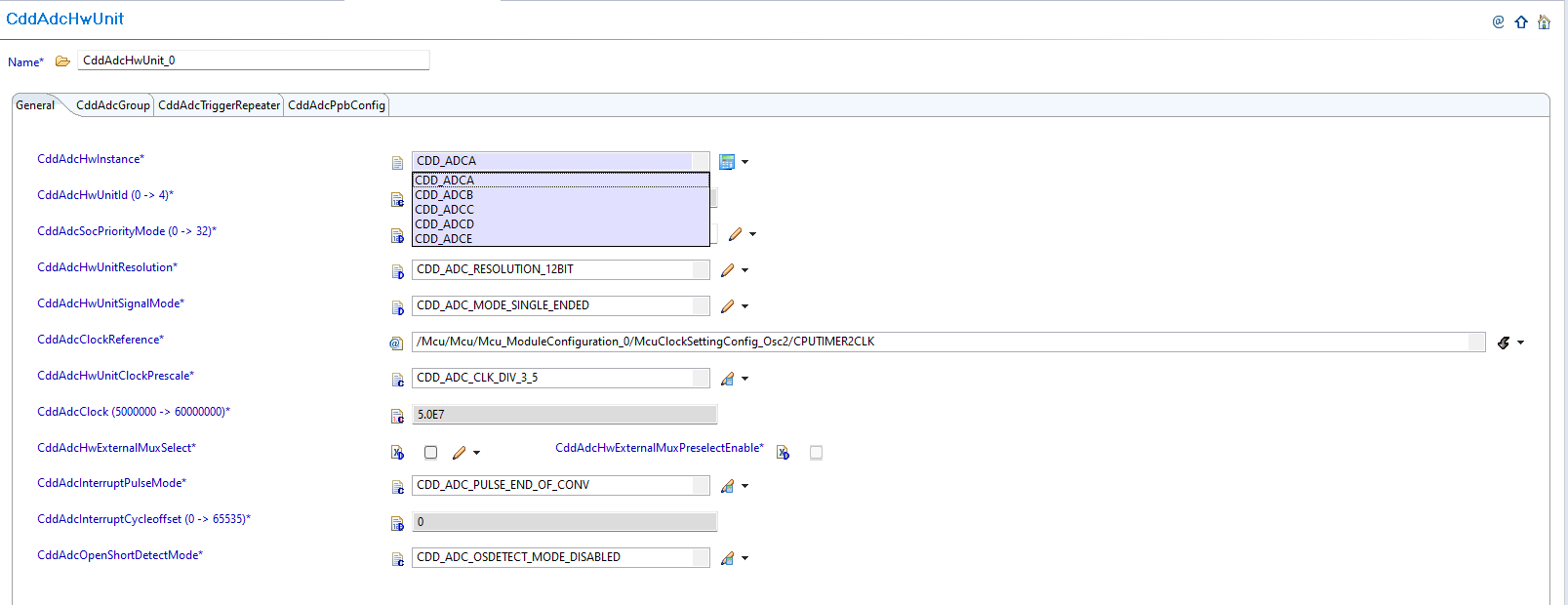
Fig. 6.47 v02.00.01: Direct ADC hardware unit parameter selection
New (v03.00.00): CDD ADC hardware unit configurations now reference instances allocated through Resource Allocator.
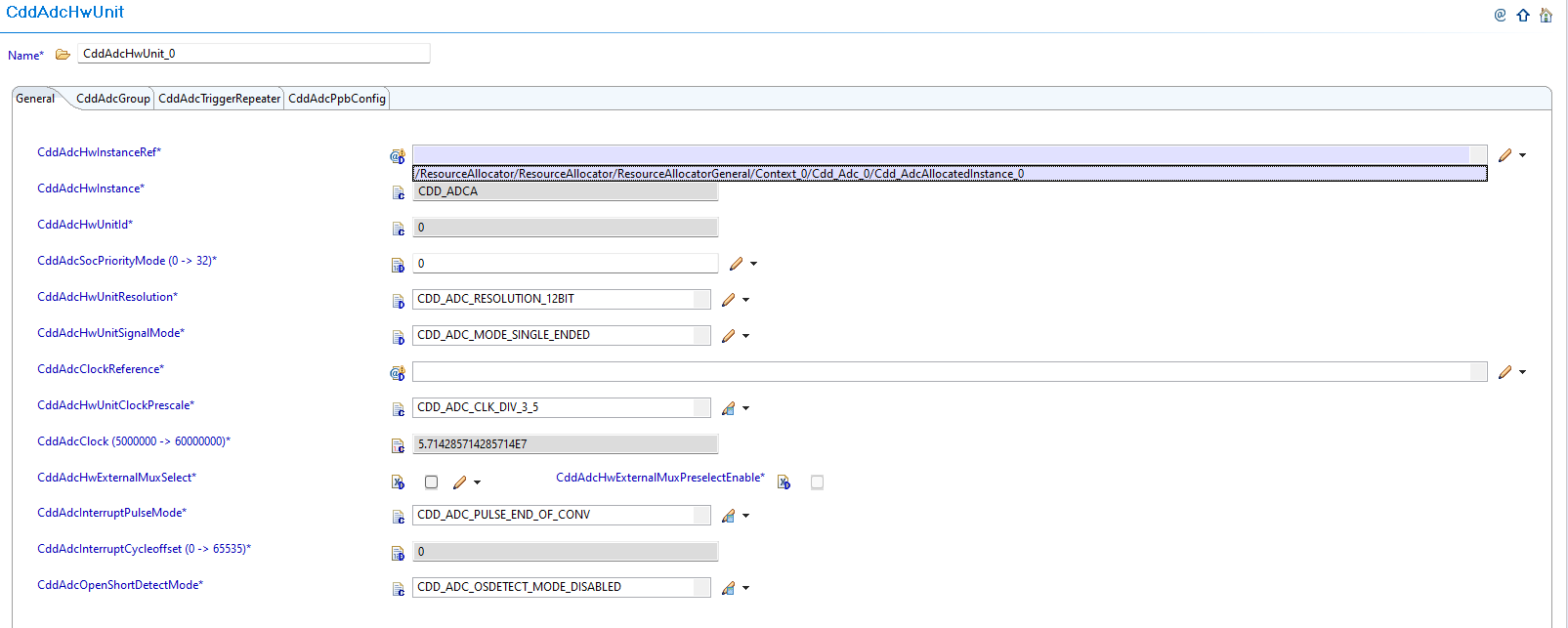
Fig. 6.48 v03.00.00: Set CddAdcHwInstanceRef to point to the corresponding Cdd_AdcAllocatedInstance in Resource Allocator
6.12.3.2.3. Migration Actions
Setup Resource Allocator: Follow Resource Allocator Setup
Navigate to Context: Navigate to ResourceAllocatorGeneral → Context → Cdd_Adc and add CDD ADC allocator:
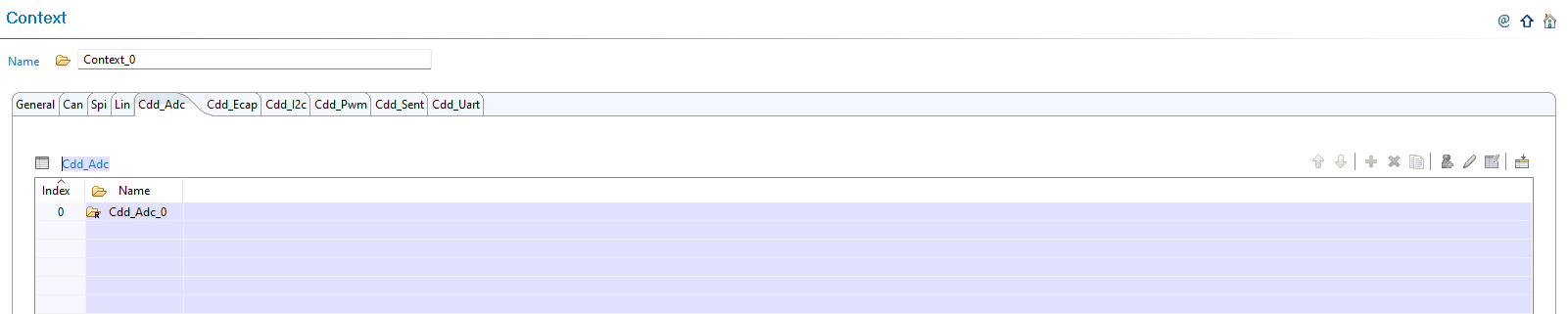
Fig. 6.49 Navigate to Context and add CDD ADC allocator
Add CDD ADC Instance: Add Cdd_AdcAllocatedInstance entries for each ADC instance your application requires:

Fig. 6.50 Add Cdd_AdcAllocatedInstance entries for each ADC instance your application requires
Configure ADC Instance: Configure the InstanceName, Frame, and BaseAddr for each allocated instance:

Fig. 6.51 Configure the InstanceName, Frame, and BaseAddr for each allocated instance
Configure Safety Checker Instance (Optional): If your application requires safety-critical ADC monitoring, configure CddAdcSafetyCheckerInstance:
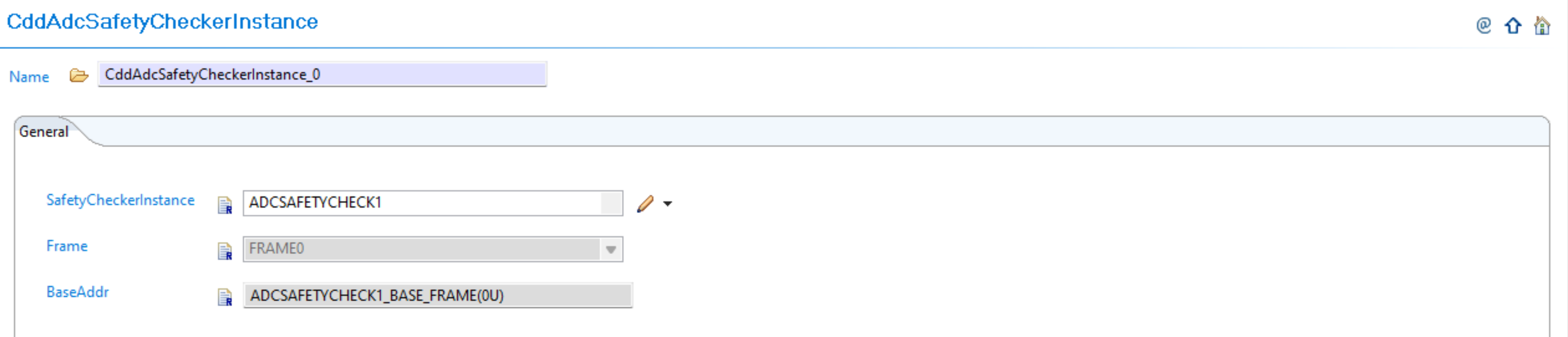
Fig. 6.52 Configure CddAdcSafetyCheckerInstance for safety-critical applications (e.g., ADCSAFETYCHECK1)
Configure Checker Interrupt Event Instance (Optional): If your application requires interrupt-based safety monitoring, configure CddAdcCheckerInterruptEvtInstance:
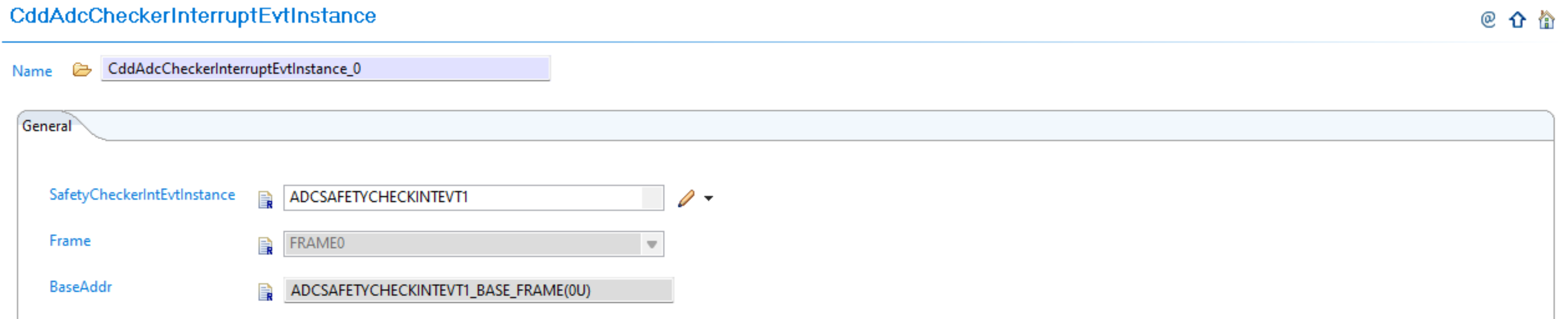
Fig. 6.53 Configure CddAdcCheckerInterruptEvtInstance for interrupt-based safety monitoring (e.g., ADCSAFETYCHECKINIEVT1)
Complete Configuration: Finalize CDD ADC instance allocation:

Fig. 6.54 Complete CDD ADC instance allocation
Navigate to CddAdcHwUnit: Navigate to Cdd → CddAdcHwUnit and update configurations to reference the CDD ADC instances allocated in Resource Allocator
Open Hardware Unit Configuration: Access the CddAdcHwUnit configuration that needs to be updated
Set Instance Reference: Set CddAdcHwInstanceRef to point to the corresponding Cdd_AdcAllocatedInstance in Resource Allocator
Verify Automatic Derivation: Confirm that the CddAdcHwInstance parameter is now automatically derived from the Resource Allocator reference
6.12.3.3. Change 2: SDK-Based DMA Integration (Optional)
6.12.3.3.1. Description
Version v03.00.00 introduces SDK-based DMA integration for efficient ADC result transfers without CPU intervention. This is an optional feature that can be enabled for improved performance in applications that require high-speed ADC data transfer.
6.12.3.3.2. Old vs New DMA Configuration
Old (v02.00.01): No DMA integration available for ADC result transfers.
New (v03.00.00): Optional SDK-based DMA integration with CddAdcEnableDma parameter.

Fig. 6.55 Add CddAdcGroup configuration for DMA
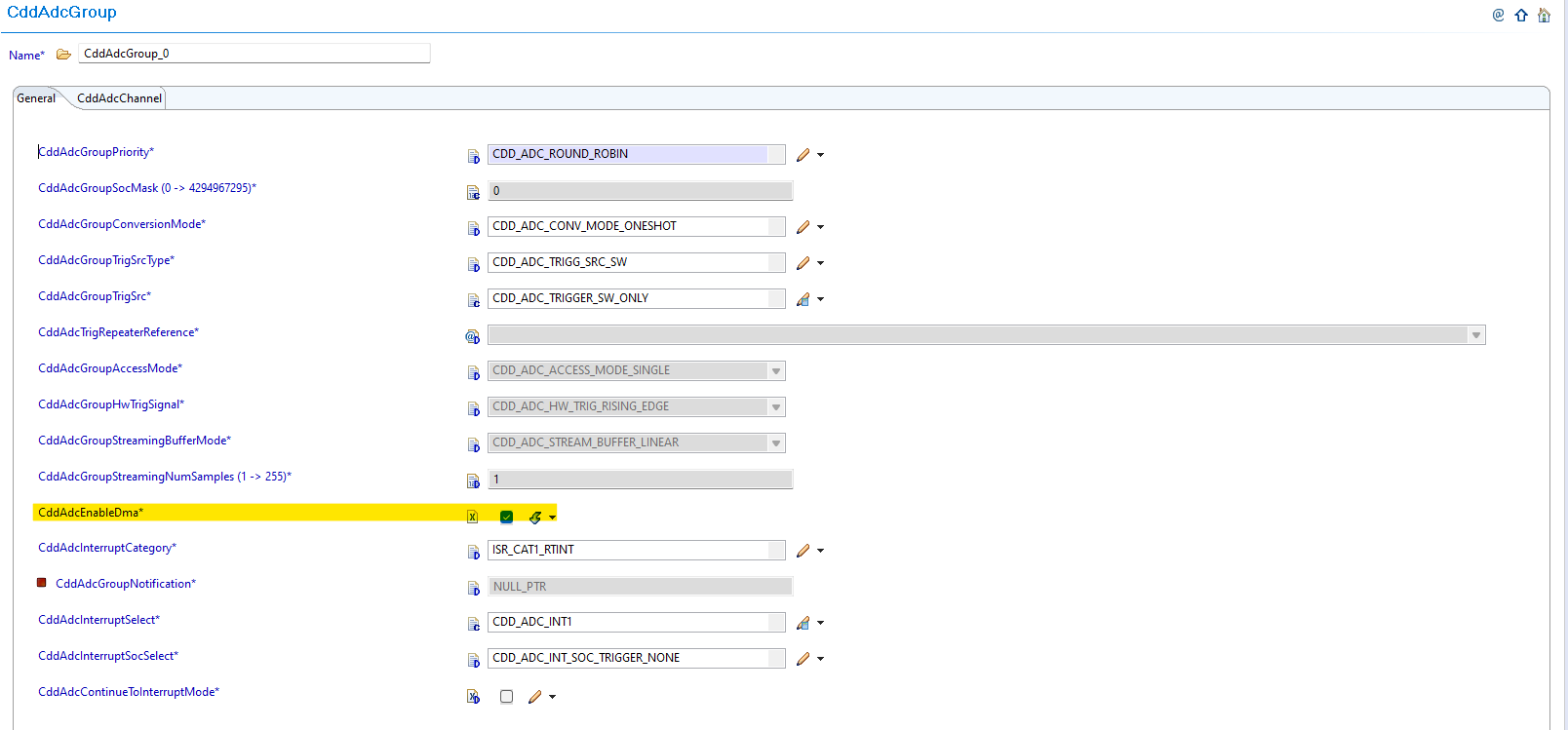
Fig. 6.56 Configure CddAdcEnableDma parameter for ADC groups
6.12.3.3.3. Migration Actions
Evaluate DMA Requirement: Determine if your application requires DMA for ADC result transfers for improved performance
Enable DMA (Optional): If using DMA for ADC result transfers, enable
CddAdcEnableDmain the group configurationConfigure SDK DMA: Configure the DMA channel in the SDK/system configuration on the application side. Refer to ADC + DMA Integration Guide for detailed integration steps and DMA Transfer Example for implementation examples
Ensure Memory Alignment: Ensure proper memory alignment for DMA buffers to prevent transfer issues
6.12.3.4. Change 3: Symbolic Name Uniqueness Requirements
6.12.3.4.1. Description
Version v03.00.00 introduces enhanced validation that requires symbolic names to be unique across configurations. When migrating from v02.00.00 to v03.00.00, EB Tresos will generate validation errors if symbolic names are not unique. This is in accordance with [SWS_BSW_00200].
6.12.3.4.2. Old vs New Validation Requirements
Uniqueness Requirements:
Parameter |
v02.00.01 |
v03.00.00 |
|---|---|---|
CddAdcGroup (container name) |
No uniqueness constraint |
Must be unique across all HW units |
CddAdcPpbConfig (container name) |
No uniqueness constraint |
Must be unique across all HW units |
CddAdcHwInstanceRef |
No uniqueness constraint |
Must be unique across all containers |
CddAdcGlbSwTrigId |
No uniqueness constraint |
Must be unique across all containers |
CddAdcCheckerInstanceRef |
No uniqueness constraint |
Must be unique across all containers |
CddAdcCheckerIntEvtInstanceRef |
No uniqueness constraint |
Must be unique across all containers |
6.12.3.4.3. Migration Actions
Review Container Names: Check all CddAdcGroup and CddAdcPpbConfig container names for uniqueness across all HW units
Review Instance References: Ensure CddAdcHwInstanceRef, CddAdcCheckerInstanceRef, and CddAdcCheckerIntEvtInstanceRef are unique across all containers
Review Trigger IDs: Verify CddAdcGlbSwTrigId values are unique across all containers
Resolve Conflicts: Update any duplicate symbolic names to ensure uniqueness and avoid validation errors during migration
Validate Configuration: Run validation in EB Tresos to confirm all symbolic names are now unique
Note
The Resource Allocator module must be configured before the CDD ADC module to ensure correct instance availability. For more details on Resource Allocator configuration, see the Resource Allocator Module User Guide.
6.12.4. v02.00.00 (i.e release v01.02.00) from v01.00.00 (i.e release v01.01.00) Migration
6.12.4.1. Summary
Version v02.00.00 introduces schema compatibility updates to align with updated plugin structure and reference paths:
AR-ELEMENT Name Change: Generated .xdm file AR-ELEMENT name requires updating for schema compatibility
MODULE-CONFIGURATION Path Update: Generated .xdm file MODULE-CONFIGURATION definition path requires updating
Reference Path Updates: Generated .xdm file reference paths require updating due to schema structure changes
Note
The CDD ADC v2.0.0 plugin contains updated schema definitions that are not backward compatible with v1.0.0 generated configurations. To use existing v1.0.0 configurations with the v2.0.0 plugin, the generated .xdm files (created by EB Tresos from your configuration) must be updated.
6.12.4.2. Change 1: AR-ELEMENT Name Change in Generated .xdm File
6.12.4.2.1. Description
When upgrading from v1.0.0 to v2.0.0, the generated .xdm file from EB Tresos contains AR-ELEMENT names that are not compatible with the new plugin schema. The AR-ELEMENT name needs to be updated in the generated .xdm file to ensure compatibility.
6.12.4.2.2. Old vs New AR-ELEMENT Configuration
Generated .xdm File AR-ELEMENT Name:
v01.00.00 Generated .xdm |
v02.00.00 Required .xdm |
|---|---|
|
|
6.12.4.2.3. Migration Actions
Locate Generated .xdm File: Find your project’s generated .xdm file (created by EB Tresos from your configuration)
Open File for Editing: Open the generated .xdm file in a text editor
Find AR-ELEMENT Reference: Locate the line containing
<d:chc name="Cdd_Adc" type="AR-ELEMENT"Update AR-ELEMENT Name: Change the AR-ELEMENT name from
Cdd_AdctoCddSave File: Save the updated .xdm file
6.12.4.3. Change 2: MODULE-CONFIGURATION Path Update in Generated .xdm File
6.12.4.3.1. Description
The MODULE-CONFIGURATION definition path in the generated .xdm file needs to be updated to reflect the new schema structure. The path must include the additional Cdd component for proper module reference.
6.12.4.3.2. Old vs New MODULE-CONFIGURATION Path
Generated .xdm File MODULE-CONFIGURATION Path:
v01.00.00 Generated .xdm |
v02.00.00 Required .xdm |
|---|---|
|
|
6.12.4.3.3. Migration Actions
Continue Editing .xdm File: In the same generated .xdm file being edited
Find MODULE-CONFIGURATION Path: Locate the line containing
<a:a name="DEF" value="ASPath:/TI_F29H85x/Cdd_Adc"/>Update Definition Path: Change the MODULE-CONFIGURATION path from
ASPath:/TI_F29H85x/Cdd_AdctoASPath:/TI_F29H85x/Cdd_Adc/CddVerify Path Structure: Ensure the updated path includes the additional
/CddcomponentSave Changes: Save the updated .xdm file
6.12.4.4. Change 3: Reference Path Updates in Generated .xdm File
6.12.4.4.1. Description
Any REFERENCE type parameters in the generated .xdm file that refer to other CDD ADC parameters by their schema path must be updated due to the schema structure change. All internal reference paths need to be updated to reflect the new schema hierarchy.
6.12.4.4.2. Old vs New Reference Paths
Generated .xdm File Reference Path Example:
For CddAdcPpbChannel references expecting a channel reference:
v01.00.00 Generated .xdm Reference Path |
v02.00.00 Required .xdm Reference Path |
|---|---|
|
|
6.12.4.4.3. Migration Actions
Continue Editing .xdm File: In the same generated .xdm file being edited
Search for Reference Paths: Find all REFERENCE type parameters that contain
/Cdd_Adc/Cdd_Adc/in their pathsUpdate Reference Paths: Change all occurrences of
/Cdd_Adc/Cdd_Adc/to/Cdd_Adc/Cdd/Verify All Updates: Ensure all reference paths now use the correct schema hierarchy
Save Final Changes: Save the completely updated .xdm file
Generated .xdm File Structure Comparison:
Old (v01.00.00 Generated .xdm File):
<d:lst type="TOP-LEVEL-PACKAGES">
<d:ctr name="Cdd_Adc" type="AR-PACKAGE">
<d:lst type="ELEMENTS">
<d:chc name="Cdd_Adc" type="AR-ELEMENT" value="MODULE-CONFIGURATION">
<d:ctr type="MODULE-CONFIGURATION">
<a:a name="DEF" value="ASPath:/TI_F29H85x/Cdd_Adc"/>
New (v02.00.00 Compatible .xdm File):
<d:lst type="TOP-LEVEL-PACKAGES">
<d:ctr name="Cdd_Adc" type="AR-PACKAGE">
<d:lst type="ELEMENTS">
<d:chc name="Cdd" type="AR-ELEMENT" value="MODULE-CONFIGURATION">
<d:ctr type="MODULE-CONFIGURATION">
<a:a name="DEF" value="ASPath:/TI_F29H85x/Cdd_Adc/Cdd"/>
Note
Only the generated .xdm files (created by EB Tresos from your configuration) can be modified. The plugin .xdm files themselves cannot and should not be modified.