The RF driver
The RF driver provides access to the radio core on the CC13x0 family. It offers a high-level interface for command execution and to the radio timer (RAT). The RF driver ensures the lowest possible power consumption by providing automatic power management that is fully transparent for the application.
This document describes the features and usage of the RF driver API. For a detailed explanation of the RF core, please refer to the Technical Reference Manual or the RF core chapter.
Features:
- Single-client and multi-client interface
- Synchronous execution of direct and immediate radio commands
- Synchronous and asynchronous execution of radio operation commands
- Event subscription and execution of callback events
- Automatic power management
- Convenient access to the radio timer
Setup and configuration
The RF driver is configured in 4 different places:
- During build configuration by chosing either the single-client or multi-client driver version.
- At compile-time by setting hardware and software interrupt priorities in the board support file.
- During run-time initialization by setting RF_Params when calling RF_open()
- At run-time via RF_control()
The RF driver comes in two versions. The single-client version allowing only one driver instance to access the RF core at a time. The multi-client driver version allows concurrent access to the RF core with different RF settings. The multi-client driver has a larger footprint and is not needed for many proprietary applications. When using TI-RTOS, the driver version can be selected in the build configuration file (.cfg) as follows:
/* RF Driver selection */
driversConfig.rfDriverMode = driversConfig.RF_SingleMode;
//driversConfig.rfDriverMode = driversConfig.RF_MultiMode;
The RF driver handles RF core hardware interrupts and uses software interrupts for its internal state machine. For managing the interrupt priorities, it expects the existance of a global RFCC26XX_HWAttrs object. This is usually defined in the board support file, for example CC1310_LAUNCHXL.c, but when developing on custom boards, it might be kept anywhere in the application. By default, the priorities are set to the lowest possible value:
const RFCC26XX_HWAttrs RFCC26XX_hwAttrs = {
    .hwiCpe0Priority = INT_PRI_LEVEL7,    // lowest:  INT_PRI_LEVEL7
    .hwiHwPriority   = INT_PRI_LEVEL7,    // highest: INT_PRI_LEVEL1

    .swiCpe0Priority =  0,     // lowest: 0:
    .swiHwPriority   =  0,     // highest: Swi.numPriorities - 1
};
When initiating an RF driver instance, the function RF_open() accepts a pointer to an RF_Params object which might set several driver parameters. In addition, it expects an RF_Mode object and a setup command which is usually generated by SmartRF Studio:
RF_Params rfParams;
rfParams.nInactivityTimeout = 4;
RF_Params_init(&rfParams);
rfParams.nInactivityTimeout = RF_convertMsToRatTicks(2);

RF_Handle rfHandle = RF_open(&rfObject, &RF_prop, (RF_RadioSetup*)&RF_cmdPropRadioDivSetup, &rfParams);
The function RF_open() returns a driver handle that is used for accessing the correct driver instance. Please note that the first RF operation command before an RX or TX operation command must be a CMD_FS to set the synthesizer frequency. The RF driver caches both the setup command from RF_open() and the CMD_FS for automatic power management.
While a driver instance is opened, it can be re-configured with the function RF_control().
Command execution
The RF core supports 3 different kinds of commands:
- Direct commands
- Immediate commands
- Radio operation commands
Direct and immediate commands are dispatched via RF_runDirectCmd() and RF_runImmediateCmd() respectively. These functions block until the command has completed and return a status code of the type RF_Stat when done.
#include <ti/devices/${DEVICE_FAMILY}/driverlib/rf_common_cmd.h>

RF_Stat status = RF_runDirectCmd(rfHandle, CMD_ABORT);
Radio operation commands are potentially long-running commands and support different triggers as well as conditional execution. Only one command can be executed at a time, but the RF driver provides an internal queue that stores commands until the RF core is free. Two interfaces are provided for radio operation commands:
- Asynchronous: RF_postCmd() and RF_pendCmd()
- Synchronous: RF_runCmd()
The asynchronous function RF_postCmd() posts a radio operation into the driver’s internal command queue and returns a command handle of the type RF_CmdHandle which is an index in the command queue. The command is dispatched as soon as the RF core has completed any previous radio operation command.
#include <ti/devices/${DEVICE_FAMILY}/driverlib/rf_common_cmd.h>

RF_Callback callback = NULL;
RF_EventMask subscribedEvents = 0;
RF_CmdHandle rxCommandHandle = RF_postCmd(rfHandle, (RF_Op*)&RF_cmdRx,
        RF_PriorityNormal, callback, subscribedEvents);

Assert(rxCommandHandle != RF_ALLOC_ERROR, "The command could not be queued.");
Command execution happens in background. The calling task may proceed with other work or execute direct and immediate commands to interact with the posted radio operation. But beware that the posted command might not have started, yet. By calling the function RF_pendCmd() and subscribing events of the type RF_EventMask, it is possible to re-synchronize to a posted command:
RF_EventMask result = RF_pendCmd(rfHandle, rxCommandHandle,
        RF_EventRxEntryDone);

// Program proceeds after RF_EventRxEntryDone, RF_EventCmdDone or RF_EventLastCmdDone.
// The two latter are always subscribed.
The function RF_runCmd() is a combination of both, RF_postCmd() and RF_pendCmd() and allows synchronous execution.
A pending or already running command might be aborted at any time by calling the function RF_cancelCmd() or RF_flushCmd(). These functions take command handles as parameters, but can also just abort anything in the RF driver’s queue:
uint8_t abortGraceful = 1;

// Abort a single command
RF_cancelCmd(rfHandle, rxCommandHandle, abortGraceful);

// Abort anything
RF_flushCmd(rfHandle, RF_CMDHANDLE_FLUSH_ALL, abortGraceful);
Callback events
The RF core generates multiple interrupts during command execution. The RF driver maps these interrupts 1:1 to callback events of the type RF_EventMask. Hence, it is unnecessary to implement own interrupt handlers. Callback events are divided into 3 groups:
- Command-specific events, documented for each radio operation command. An example is the RF_EventRxEntryDone for the CMD_PROP_RX.
- Generic events, defined for all radio operations and originating on the RF core. These are RF_EventCmdDone and RF_EventLastCmdDone. Both events indicate the termination of one or more RF operations.
- Generic events, defined for all radio operations and originating in the RF driver, for instance RF_EventCmdCancelled.
How callback events are subscribed was shown in the previous section. The following snippet shows a typical event handler callback for a proprietary RX operation:
void rxCallback(RF_Handle handle, RF_CmdHandle command, RF_EventMask events)
{
    if (events & RF_EventRxEntryDone)
    {
        Semaphore_post(rxPacketSemaphore);
    }
    if (events & RF_EventLastCmdDone)
    {
        // ...
    }
}
Additionally, the RF driver can generate error and power-up events that do not
relate directly to the execution of a radio command. Such events can be
subscribed by specifying the callback function pointers pErrCb abd
pPowerCb in RF_Params.
Power management
The RF core is a hardware peripheral and must be explicitly switched on and off. The RF driver handles that automatically and provides the following power-optimization features:
- Lazy power-up and radio setup caching
- Power-down on inactivity
- Deferred dispatching of commands with absolute timing
Lazy power-up and radio setup caching
The RF core optimizes the power consumption by switching the RF core on as late as possible. For instance does RF_open() not power up the RF core immediately. Instead, it waits until another radio operation command is posted to the RF driver via RF_postCmd() or RF_runCmd().
The function RF_open() takes a radio setup command as parameter
and expects a CMD_FS command as the following radio operation. This command
is cached internally in the RF driver and will be used for every following
power- up procedure. Whenever the client re-runs a setup command or a
CMD_FS command, the driver updates its internal cache with the new
settings.
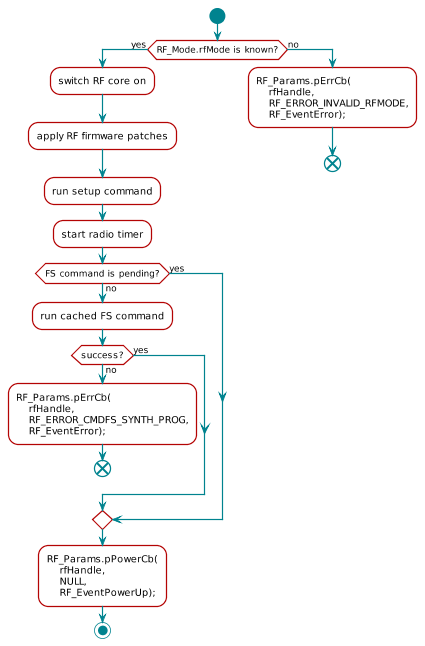
Figure 23. The RF core power-up sequence executed by the RF driver.
The power-up sequence is described in Figure 23..
By default, the RF driver measures the time that it needs for the power-up
procedure and uses that as an estimation for the next power cycle. On the
CC13x0 devices, power-up takes usually 1.6 ms. Automatic measurement can be
suppressed by specifying a custom power-up time with nPowerUpDuration in
RF_Params. In addition, the client might set
nPowerUpDurationMargin to cover any uncertainity when doing automatic
measurements. This is necessary in applications with a high hardware interrupt
load which can delay the RF driver’s internal state machine execution.
Power-down on inactivity
Whenever a radio operation completes and there is no other radio operation in the queue, the RF core might be powered down. There are two options in the RF driver:
- Automatic power-down by setting the parameter
nInactivityTimeoutin RF_Params. The RF core will then start a timer after the last command in the queue has completed. The default value isBIOS_WAIT_FOREVERand this feature is disabled. - Manual power-down by calling RF_yield(). The client should do this whenever it knows that no further radio operation will be executed for a couple of milliseconds.
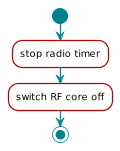
Figure 24. The RF core power-down procedure executed by the RF driver.
During the power-down procedure, shown in Figure 24., the RF driver stops the radio timer and saves a synchronization timestamp for the next power-up. This keeps the radio timer virtually in sync with the RTC even though it is not running all the time.
Deferred dispatching of commands with absolute timing
When dispatching a radio operation command with an absolute start trigger that is ahead in the future, the RF driver defers the execution and powers the RF core down until the command is due. It does that only, when:
cmd.triggerTypeis set toTRIG_ABSTIME- The difference between RF_getCurrentTime() and
cmd.startTimeis at not more than 3/4 of a full RAT cycle. Otherwise the driver assumes thatcmd.startTimeis in the past. - There is enough time to run a full power cycle before
cmd.startTimeis due. That includes:
If one of the conditions are not fullfilled, the RF core is kept up and running and the command is dispatched immediately. This ensures, that the command will execute on-time and not miss the configured start trigger.
Convenience features
The RF driver simplifies often needed tasks and provides additional functions. For instance, it can read the RSSI while the RF core is in RX mode using the function RF_getRssi():
int8_t rssi = RF_getRssi(rfHandle);
Assert (rssi != RF_GET_RSSI_ERROR_VAL, "Could not read the RSSI");
For defining absolute triggers in radio operation commands, one often needs to know the current time. This can be achieved with the function RF_getCurrentTime(). When the RF core is not up and running and the radio timer is disabled, this function can still return a previse value:
uint32_t rfTime = RF_getCurrentTime();